
Below you will find a series of resources that you can use to help you properly plan your event.
At no point in time should you be sending final competition instructions or badge course information to the Western Cape Scouters Mailing List. The list is only to be used when advertising the events. Once this is done, all information must be sent directly to the applicants or entrants using the contact details provided by them
Badge Courses
The information in this section is here to help you navigate the running of a badge course.
Badge Course Applications
All badge course applications must be done on Scouts.Digital. In this there is no exception. If a Scout does not have a Scouts.Digital profile then they MUST contact their Troop Scouter to generate one for them. This is not something that is done at a Regional level.
If Scouts or their parents are unsure of the application process then please send them to the Western Cape Scout Training Guide.
Badge Course Communication Timelines and Practices
The timelines shown below are the basic points that each Course Leader should be hitting when they are administering a course. They will definitely bring their own style to it but the below is the minimum administrative process that should be adhered to.
Do not worry too much about remembering the information below. In the period leading up to the course the information will be sent to you via automated email as a reminder.
- Send and email to the WC Scouters Mailing List (wcscouters@lists.scouts.org.za) to advertise the course
- Email the Troop Scouters in the Region with a similar message
- Send an email to any Scouts that have already applied and advise them to complete their applications asap
If you would like to download and make use of an event flyer you can download a template from Resources and then have it sent out.
Once the Last Booking Date for the course comes around you will need to do the following:
- Log into Scouts.Digital and pull an Excel report of the current applications. Send an email to the Scouts who have not yet paid advising that today is the closing date, and that should they wish to be on course their action is needed
- Send an email to the regional mailing list (wcscouters@lists.scouts.org.za) advising that today is the closing date and any last minute applications should be made asap
- If applicable you can also send a mail to the Troop Scouters in the Region advising them that today is the Last Booking Date
- Download the Course Finance Document via Resources
- Once completed, submit it via the Finance Submissions page
- All scouts who have paid for the course were marked as CONFIRMED
- All scouts who were accepted onto the course were marked as GUARANTEED
By now you should also have filed your Permit and had it approved as your Course Numbers should be reasonably final.
- All receipts have been collected (physically or electronically) - no receipt = no refund
- The Post-Course Finances are compiled showing all expenses
- Ensure the Refunds Form has been completed accurately and submitted with Post-Course Finances
- All Scouts who were on course have been marked as Attended on Scouts.Digital
- All Scouts who met the course requirements have been marked as Complete on Scouts.Digital
Once you have submitted the Post-Course Finances they will be reviewed by the Regional Delegates. As this proceeds you will receive automatic email updates. Further information on this will be in the email sent to you as soon as your finances are submitted.
Competitions
The information in this section is here to help you navigate the running of a competition.
Competition Entries
Sea Scout Competitions are currently handled separately but the primary Competition Entry method is via the Whats On page on the Western Cape Website.
The entry table is currently displayed below. The Entry Forms themselves are only opened on the opening date vs being left open indefinitely. When the competition opens, an email should be sent out to the Region advising such. The opening date must be determined by the Chief Judge and then they must send an email to james.stewart(at)scouts.org.za to advise when to open the entry form.
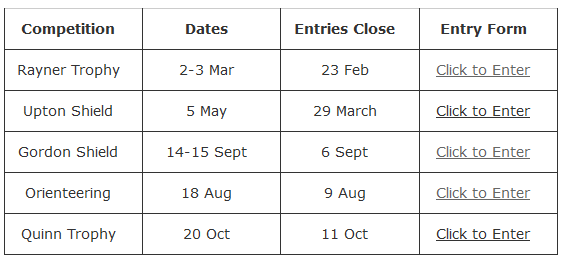
Troops need only click on the competition they wish to enter to be taken to the online entry form. Once they enter the following processes occur:
- An email goes to the Troop contact confirming their entry
- An email goes to the Chief Judge to advise of the entry
- An email with the POP and Invoice information goes to HQ for processing
The Chief Judge and HQ will also have access to a dashboard that shows all entries and their details, but this is emailed to them.
Competition Communication Timelines and Practices
The timelines shown below are the basic points that each Chief Judge should be hitting when they are running a competition. They will definitely bring their own style to it but the below is the minimum administrative process that should be adhered to.
Do not worry too much about remembering the information below. In the period leading up to the competition the information will be sent to you via automated email as a reminder.
- It is time to send an email to the WC Scouters mailing list (wcscouters@lists.scouts.org.za) to advertise the competition
- Send an email to the Troop Scouters to advise the same (see Resources)
- Send an email to the regional mailing list (wcscouters@lists.scouts.org.za) advising that today is the closing date and any last minute applications should be made asap
- It would do to send an email to all Troop Scouters in the Region that today is the closing date for the competition (see Resources)
- Download the Competitions Finance page via Resources
- Once completed, submit via the Finance Submissions page
- Have collected any and all receipts that will need to be submitted
- Now have two weeks to submit the final Post-Competition Finances via Finance Submissions
- Submit the Post-Competition Finances via Finance Submissions
- Submit the competition receipts electronically (physical ones handed in asap)
Permits
For an event you will need to ensure that a permit has been filed and approved by the RTC Scout Programme (prior to the event starting). If you are unsure how to file a permit please CLICK HERE.
Facilities
It is imperative that you book your desired facility in time else you will likely have to scramble at the last minute. Just because events are always held in certain places does not mean that their booking is a given. To begin the process please go to the Western Cape Facilities page and select the facility you wish to use.
Event Finance Rules
If you are running the event you will need to ensure that you are familiar with the event finance policies which can be found by Clicking Here. You will need to use these when you submit your finances before and after so best to know what is happening sooner rather than later.
Incident Reporting
In the event of accident/injury on your event. Or if an incident needs to be reported to the Regional Leadership, please see the Incident Reporting page.